May be you are developing a plugin or a theme and it has something to do with handling some pagination of your custom tables data. Here’s how we can simply manage it, I am not going to build all the admin panel stuffs, but just showing you the process.
Step 1:
Let’s get the page number from the url query string. If we don’t find anything, we’ll set the page number to 1.
$pagenum = isset( $_GET['pagenum'] ) ? absint( $_GET['pagenum'] ) : 1;Step 2:
Now we need to set per page entry limit and the page offset. We will use the limit and offset to get data from our MySQL query. If you are confused about the offset, may be you’ve seen it on PHPMyAdmin like this: "SELECT * FROM `table_name` LIMIT 0, 10". Here, we are getting the first 10 entries from our database. If we want to get the next 10 entries, our limit will be "LIMIT 10, 10". So the first digit for the limit is the offset. It tells us from where we’ll get our next entries.
$limit  = 10;
$offset = ( $pagenum - 1 ) * $limit;
So, by these two lines we are setting the limit and our offset dynamically.
Step 3:
Now we need to get the entries from our database table with the help of our limit and offset variable and need to show them as you like, may be in a table.
$entries = $wpdb->get_results( "SELECT * FROM {$wpdb->prefix}table_name LIMIT $offset, $limit"; );So, now if you change the url “pagenum” parameter from your browser, you can see that we are getting the entries by our page number. So it’s like we have completed our pagination system :D
Step 4:
As we have completed the pagination system working, we just need to show the pagination links now and we’ll be done. WordPress gives us a nice function "paginate_links" to generate a cool pagination navigation link.
At first, we need to get the count of total number of entries in our table and calculate how many pages will need to show the whole entries.
$total        = $wpdb->get_var( "SELECT COUNT(`id`) FROM {$wpdb->prefix}table_name" );
$num_of_pages = ceil( $total / $limit );
Now, we can use that nifty function paginate_links to generate our pagination links.
$page_links = paginate_links( array(
    'base'      => add_query_arg( 'pagenum', '%#%' ),
    'format'    => '',
    'prev_text' => __( '«', 'aag' ),
    'next_text' => __( '»', 'aag' ),
    'total'     => $num_of_pages,
    'current'   => $pagenum
) );

if ( $page_links ) {
    echo '<div class="tablenav"><div class="tablenav-pages" style="margin: 1em 0">' . $page_links . '</div></div>';
}
So, we are passing our current page number and total number of pages to that function and we are getting a nice and cool pagination system.
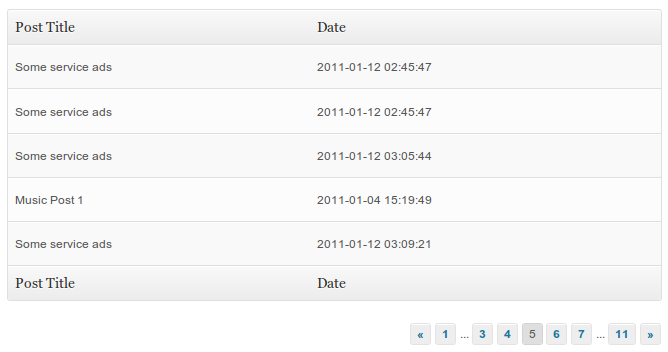
Here’s a sample code for generating a table with data from your posts table.
<?php
global $wpdb;
$pagenum = isset( $_GET['pagenum'] ) ? absint( $_GET['pagenum'] ) : 1;
$limit = 5;
$offset = ( $pagenum - 1 ) * $limit;
$entries = $wpdb->get_results( "SELECT * FROM {$wpdb->prefix}posts LIMIT $offset, $limit" );
echo '<div class="wrap">';
?>
<table class="widefat">
<thead>
<tr>
<th scope="col" class="manage-column column-name" style=">Post Title</th>
<th scope="col" class="manage-column column-name" style=">Date</th>
</tr>
</thead>
<tfoot>
<tr>
<th scope="col" class="manage-column column-name" style=">Post Title</th>
<th scope="col" class="manage-column column-name" style=">Date</th>
</tr>
</tfoot>
<tbody>
<?php if( $entries ) { ?>
<?php
$count = 1;
$class = '';
foreach( $entries as $entry ) {
$class = ( $count % 2 == 0 ) ? ' class="alternate"' : '';
?>
<tr<?php echo $class; ?>
<td><?php echo $entry->post_title; ?></td>
<td><?php echo $entry->post_date; ?></td>
</tr>
<?php
$count++;
}
?>
<?php } else { ?>
<tr>
<td colspan="2">No posts yet</td>
</tr>
<?php } ?>
</tbody>
</table>
<?
$total = $wpdb->get_var( "SELECT COUNT(`id`) FROM {$wpdb->prefix}posts" );
$num_of_pages = ceil( $total / $limit );
$page_links = paginate_links( array(
'base' => add_query_arg( 'pagenum', '%#%' ),
'format' => '',
'prev_text' => __( '«', 'aag' ),
'next_text' => __( '»', 'aag' ),
'total' => $num_of_pages,
'current' => $pagenum
) );
if ( $page_links ) {
echo '<div class="tablenav"><div class="tablenav-pages" style="margin: 1em 0">' . $page_links . '</div></div>';
}
echo '</div>';Output:
33 thoughts on “Simple pagination system in your WordPress plugins”
Hello, Tareq, I like your post. Great things are here for the people who loves to learn. I used pagination this way in my kolorob project at first. I had to learn it myself, but now I have changed the structure now, because I changed the uri structure of Kolorob from domain?page=1 to domain/page/2 to make it more SEO friendly. Thanks for your post.
Do you know how to paginate threaded comments?
paginate_comments_links might help you. I see other plugins are available out there. I didn't tried to paginate the commented though.
this really nice tutorial, many thanks to you tareq.. :)
Hi,
Fantastic tutorial!
One small typo that I copied. On the first section you have
'total' => $total
It should be:
'total' => $num_of_pages
Like the second part... correct?
Really good article indeed!
Thank you thousand times.
thank buddy
Thank You
Thank you, nice tutorial, and it was really useful.
Thank u.. :)
It's really useful for me. Thanks buddy..!
Really its Good
how to make for custom table?
Simple. Just change name table in $wpdb->get_results
For my latest plugin, I needed the pagination option and found the solution here. Just want to know from you that, is it OK to use @ceil instead of only ceil? I was getting an error of 'division by 0' when found_posts is 0. Thanks for the very helpful tutorial.
No thats not ok to use
@sign. You are forcing PHP to not throw an error although you have one. The logic needs to be fixed.This tutorial is great, I have successfully added pagination into my plugin but the only problem I am facing is when I save options for the fields on one page all the options for the fields on all other pages are reset automatically. How can I fix this problem?
I can post the code if you want. My plugin's page looks like this: http://usmanali.net/plugin-page.png
Your help will really be appreciated.
Thank you!
May be you should put the page number in your forms hidden field.
and How do I do that exactly Tareq?
Script is very good , but could you please tell me how to change limit of wordpress posts in page/2 .. Thanks in advance :)
Hi! It is really simple and very useful thanks a lot ... kudos
I also got the same findings as this comment
the
'total' => $total,should be
'total' => $num_of_pages,BTW thanks a lot and jazakALLAH for this excellent WP way to pagination, and the good part is: it's from Bangladesh. We're proud of you.
I've fixed it. Thanks for the appreciation :)
Is there a way something can be added to this code to help secure the entry should the user change to get url to something malicious? Thanks!
useful post, and also easy to understand.
Simply Superb man..... Great article.... Thankyou soo much... I have integrated this in seconds.
Hi, a newb question here but where exactly do you put the code to make this pagination work?
thanks and this code work for me :)
Hi
This is nice article and keep this good work.